
2× Image Upscaling: AI vs. Lanczos on Two Test Images
ClapClip Team · Published on 2026-10-24 · 5 min read
We took two reference photos, degraded them on purpose, and upscaled them back with 2× AI and with a plain Lanczos resize. On both, the AI result sat closer to the original: PSNR +0.09 dB and +0.58 dB, SSIM +0.024 and +0.029.
That is a small experiment, not a general claim about upscalers. Below are the exact inputs, the machine, the scoring method, and what these numbers cannot tell you.
Key takeaways
- Two test images, one scale, one control. 2× only, AI versus OpenCV
INTER_LANCZOS4on identical inputs. - The AI result scored higher on both images. astronaut PSNR 27.331 vs 27.240, SSIM 0.8546 vs 0.8301. coffee PSNR 27.088 vs 26.506, SSIM 0.7622 vs 0.7333.
- This measures fidelity to the original, not beauty. PSNR and SSIM reward similarity; they do not tell you whether the result looks natural.
- The test was run on the desktop component. Not the browser tool, and not a full app session.
What we actually measured
Two reference images were downscaled by half with INTER_AREA, then compressed to JPEG at quality 50. That input was upscaled 2× and compared with the untouched reference.
| Test image | Input | Output | Reference |
|---|---|---|---|
| astronaut | 256 × 256 JPEG Q50 | 512 × 512 PNG | 512 × 512 original |
| coffee | 300 × 200 JPEG Q50 | 600 × 400 PNG | 600 × 400 original |
- Machine: Windows 11 Enterprise 26100, Intel i9-14900HX (24 cores / 32 threads), 31.7 GiB RAM, RTX 4060 Laptop with 8188 MiB.
- Path: the Windows app's native 2× component through DirectML. The adapter in use was not logged, so the numbers are not an RTX 4060 benchmark.
- Method: each run started a fresh process and was timed from process start to exit, so the figures include model load and file I/O. Three runs per image per method; the quality scores come from the first run, whose output hashed identically across all three.
- Scoring: full-frame RGB PSNR (
data_range=255) and SSIM (Gaussian window, sigma 1.5, population covariance), scikit-image 0.26.0. No edge cropping.
Why Lanczos is the right control
Most "AI upscaler" demos compare against a stretched image with no interpolation quality argument at all. Lanczos4 is a strong classical resampler, so beating it is a meaningful result — and beating a bilinear stretch is not.
It is also the honest control for the question a reader actually has: if I just resize in my editor, what do I lose?
The results
| Test image | Method | PSNR (dB) | SSIM |
|---|---|---|---|
| astronaut | Lanczos 2× | 27.240 | 0.8301 |
| astronaut | AI 2× (Fast) | 27.331 | 0.8546 |
| coffee | Lanczos 2× | 26.506 | 0.7333 |
| coffee | AI 2× (Fast) | 27.088 | 0.7622 |
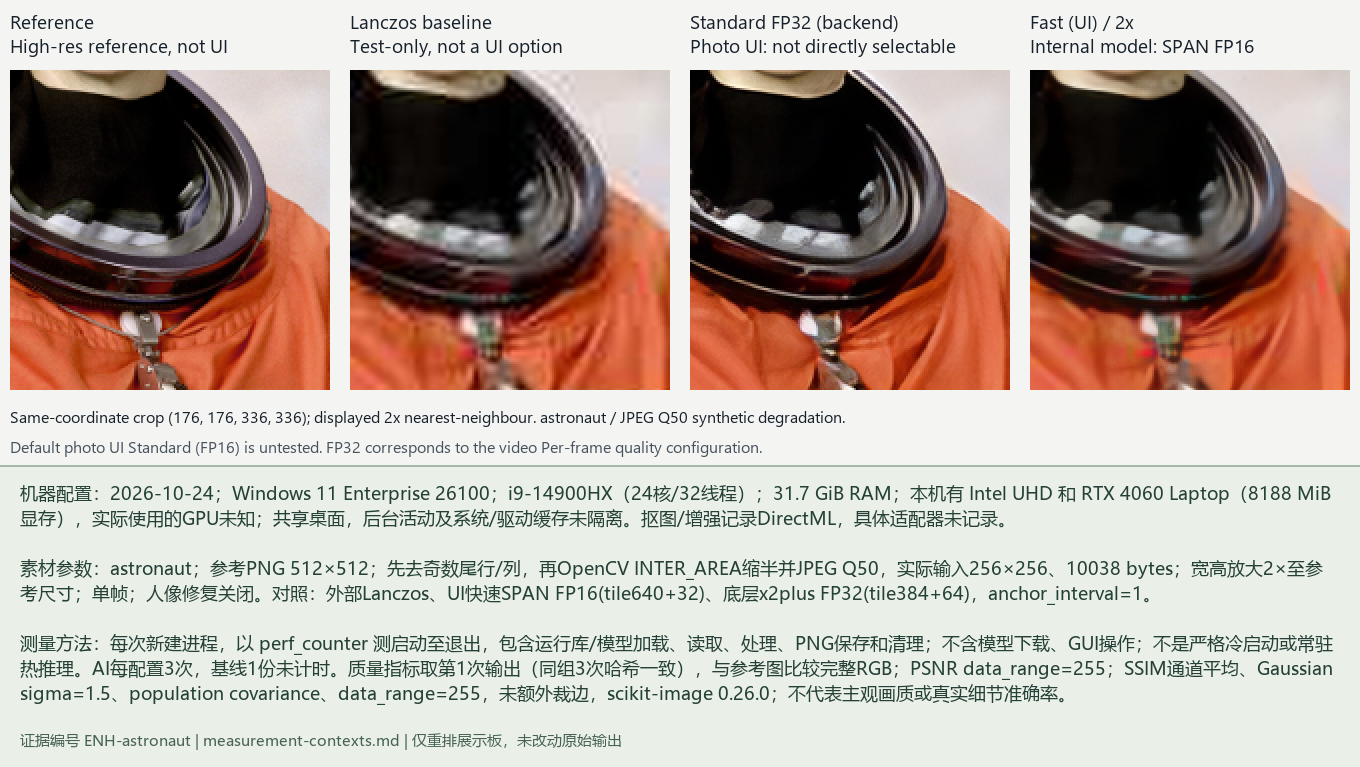
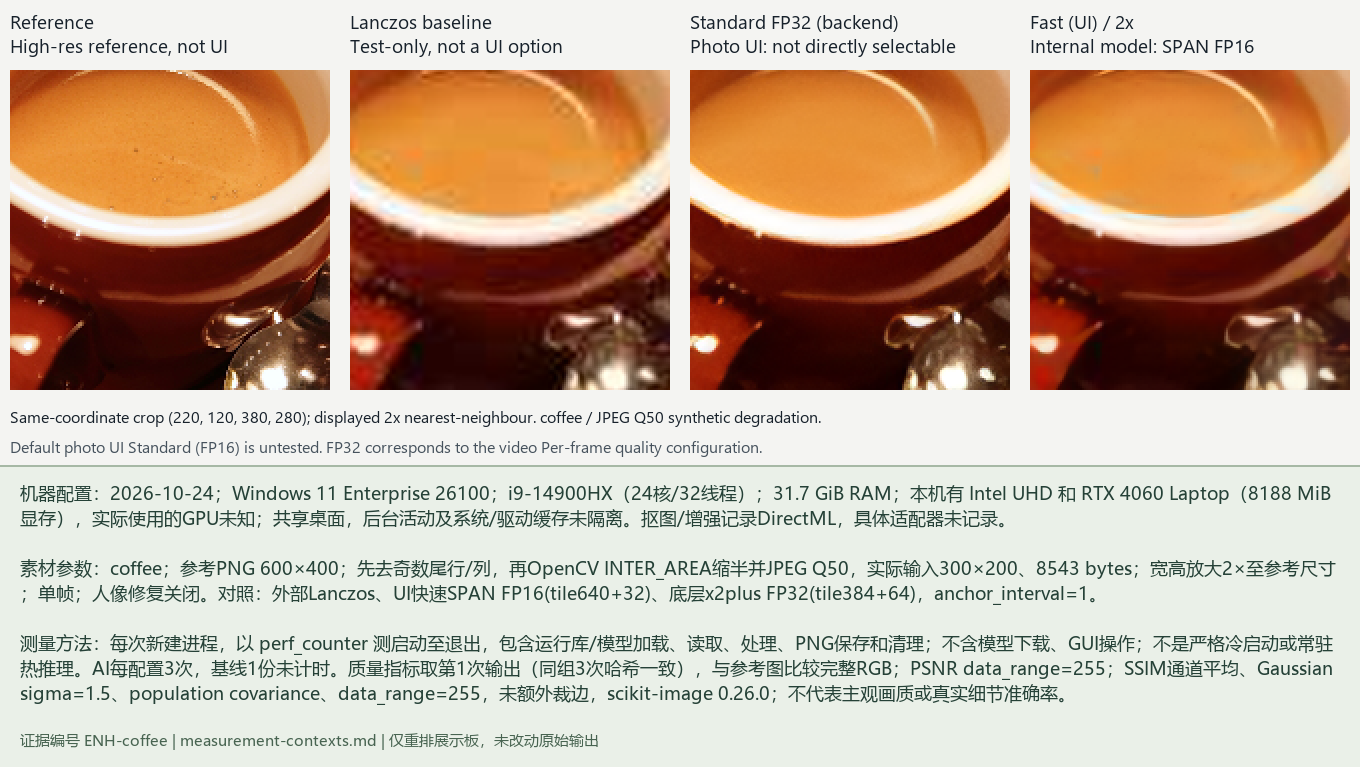
The larger jump is on the coffee image, which has soft edges and limited texture — the case where interpolation has the least information to work with.
What these numbers do not tell you
- Two images are not a population. Both are well-lit reference photos with a single obvious subject.
- The input is synthetic. We degraded a good photo ourselves, so the test rewards recovering a known original. A real low-resolution photo has no such original to recover.
- PSNR and SSIM punish invention. A model that adds plausible detail is scored as an error if the original did not have that detail. A lower score is not automatically a worse-looking result.
- JPEG at quality 50 is one degradation, not all of them. Motion blur, sensor noise and heavy compression behave differently.
- This is the native component, not an app session. No GUI import, no export dialog, no queue.
When 2× is the right move — and when it is not
The limits decide this before quality does:
- Input ceiling. The online enhancer accepts up to 8 MP and 8192 px on a side; anything larger is refused rather than downscaled for you.
- Output ceiling. 32 MP caps the result. Because 4× produces sixteen times the pixels, 4× only fits a source of 2 MP or less — even a 1920 × 1080 frame is over that line.
- So 2× is the practical choice for anything from a phone or a 1080p frame, while 4× is for small crops and old low-resolution files.
- Do not upscale twice. Two 2× passes compound both the artefacts and the file size; start from the largest original you still have.
How to check your own result in a minute
- Keep the original open next to the upscaled file at the same display size.
- Look at a hard edge, then at a flat area. AI upscalers usually win the edge and can lose the flat area by adding texture that was never there.
- Zoom to 100% on a face or text. If letters or eyelashes turn into wavy strokes, the model is inventing.
- Compare file sizes at the same resolution. A large jump means added detail — not necessarily correct detail.
Bottom line
On two deliberately degraded test images, 2× AI upscaling stayed closer to the original than a Lanczos resize by a small but consistent margin, and the gain was larger on the softer image. That supports using it for 2× enlargements of ordinary photos; it does not establish that it beats every resampler, or that it improves a photo that was never downscaled in the first place.
The raw measurements, inputs, outputs and scoring script for this test are kept together so the numbers can be re-run rather than taken on trust. Other studies, and the reporting standard they all follow, are listed on the measurements page.
Related ClapClip tools
AI Image Upscaler
Upscale images with AI on Windows. ClapClip enlarges photos while adding real detail — no blur, no uploads, fully local on your GPU.
Batch Video & Image Enhancement
Enhance multiple videos and images at once. ClapClip's batch mode processes a folder of files on your Windows GPU — no per-file limits, fully local.
Desktop Face Swap App
Download a private face swap app for Windows 10 and 11. Swap faces in videos and photos locally with live preview, GPU acceleration, and no uploads.